Elgato Stream Deck +
Elgato has released the new Stream Deck + which includes the buttons you are used to as well as a new LCD touchscreen and four dial knobs. Stream Deck + is the latest to join the USB-controlled Stream Deck family. You can streamline your digital life whether it’s video editing, photo manipulation, live streaming, or general task management.
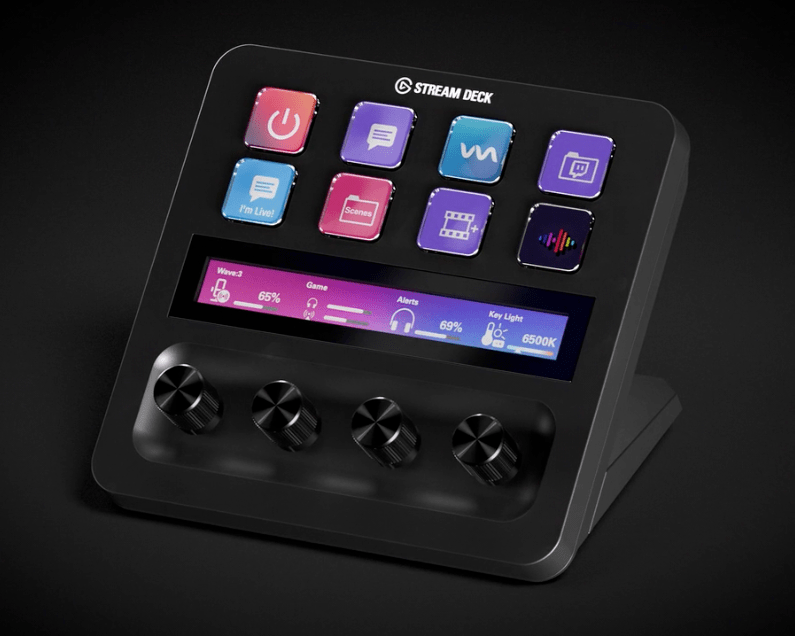
The new Stream Deck + has eight of the same LCD keys that you are used to (they are even a bit larger) and adds two brand-new inputs to take your workflow to the next level. The bottom half is where the new Stream Deck+ shines. Most notable are the four endless scrolling knobs which basically means that you can spin them forever in either direction with tactile clicking. Above the dials and below the keys is an LCD touchscreen with many different functions. It acts as the display for the dial, showcasing the different levels for each dial. You can also tap the touchscreen to execute an action, long press for another action, or swipe to navigate through Stream Deck pages.
If you use a Stream Deck as I do, you are always wanting more. I am excited to see what third-party developers like Better Touch Tool will be able to do with the new Stream Deck +.
From Elgato:
Install over 200 ready-made plugins or map keyboard shortcuts to keys and dials. Stream Deck + integrates with any workflow from video creation, podcasting and live production to photo editing, graphic design, and beyond.
Also, make sure to check out this hands-on video from randomfrankp